Who this is for: anyone who used T3 Code before v0.1.0. That covers the old “Alpha” desktop app and Nightly builds from before 2026-10-03. If you installed T3 Code for the first time on 0.1.0 or later, you are already on V2, and this page doesn’t apply.
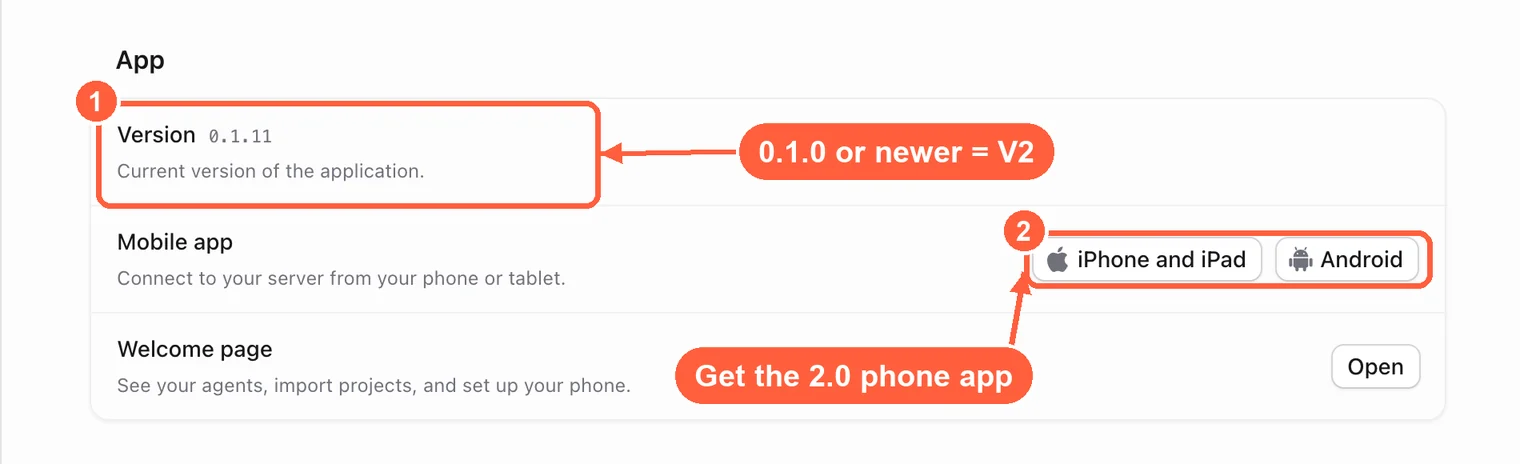
Not sure which one you have? Open Settings → About. A version of 0.1.0 or newer means V2.
Time: about 15 minutes, longer if you have remote machines.
What the upgrade actually does
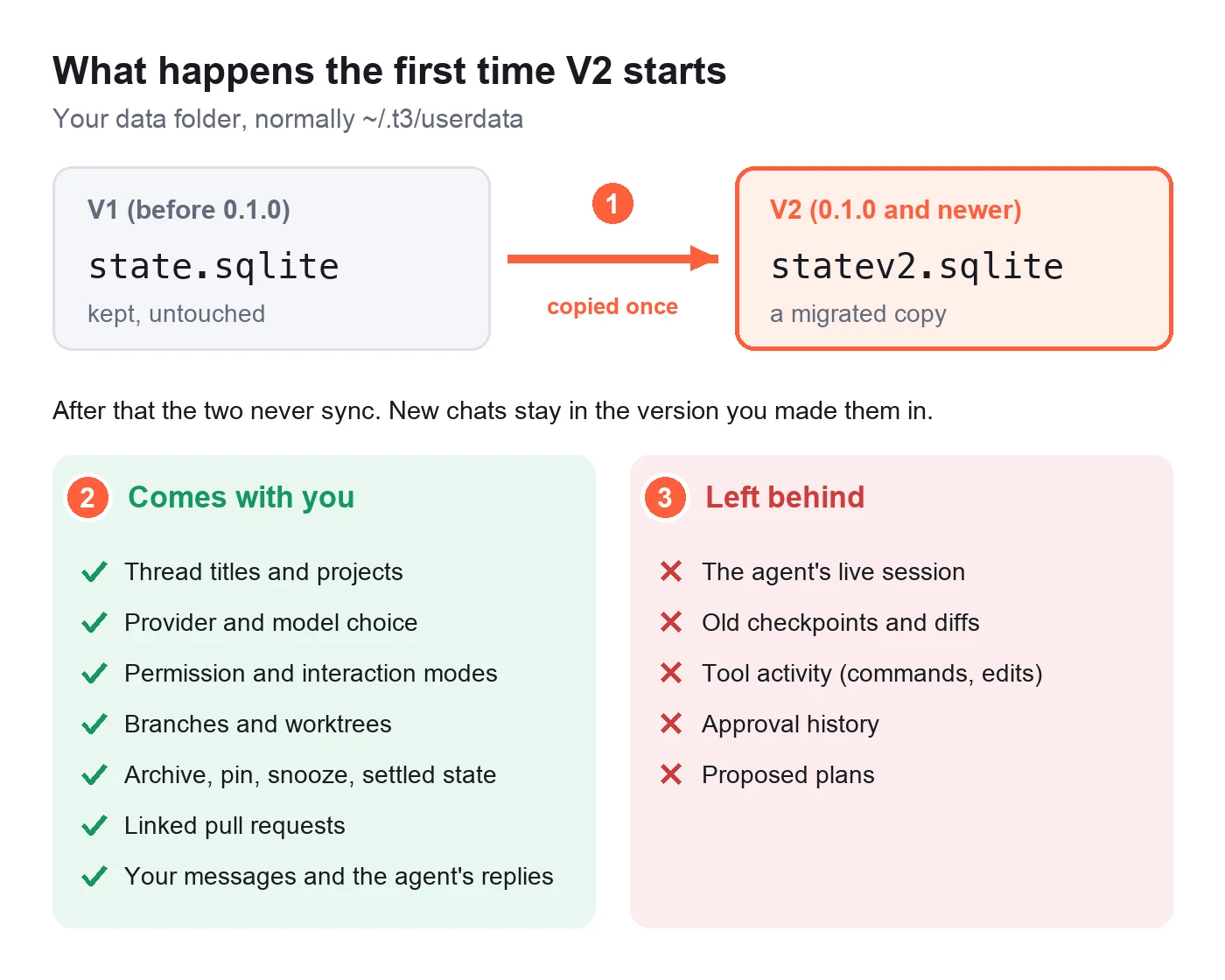
In practice, the only thing you will notice is that old threads start a fresh agent session the next time you message them. The agent gets as much of the old conversation as fits, and it can look up the rest. Step 6 shows how to continue an important thread without the agent forgetting things.
Step 1: Finish or stop running work
Server updates restart the connection, which can interrupt running agents and terminal commands. Before you start:
- Let running turns finish, or stop them.
- Answer any waiting approval or question. This matters most for OpenCode 1.x, where a request still waiting during the restart is not shown again.
- Note the threads you care most about. You will check them in Step 5.
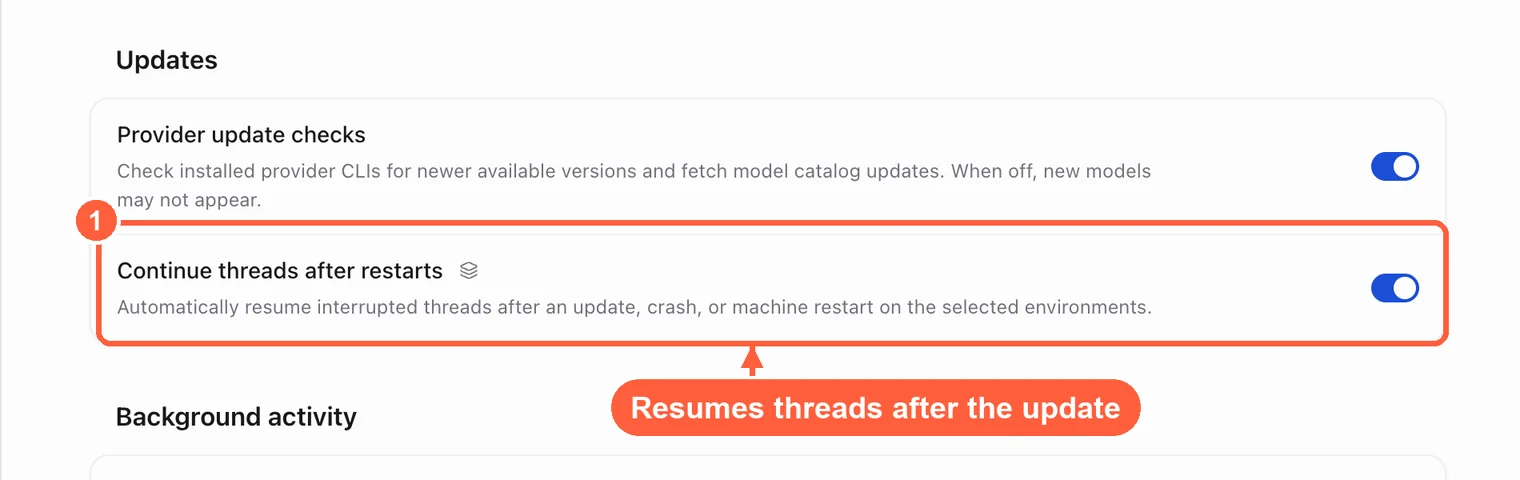
If you’re already on a V2 build and only updating to a newer one, check that Settings → Maintenance → Continue threads after restarts is on. It’s on by default. It resumes supported threads that the restart interrupts. It doesn’t apply to the V1 → V2 jump itself, because migrated threads always start a fresh session (Step 6).
Step 2: Back up your data folder
T3 Code has no “export all threads” button, so make a copy of the folder itself. Quit the desktop app (or stop the t3 server) first, then run the command for your system.
macOS / Linux:
cp -R ~/.t3/userdata ~/t3-userdata-backup-$(date +%F)Windows (PowerShell):
Copy-Item -Recurse "$HOME\.t3\userdata" "$HOME\t3-userdata-backup"If you start the server with --base-dir <path>, copy <path>/userdata instead. For a remote machine, make the copy on that machine.
Done when: the backup folder has a state.sqlite file in it.
V2 won’t delete
state.sqlite, so the backup is a second safety net. Keep it until you have checked your important threads in V2.
Step 3: Update in the right order
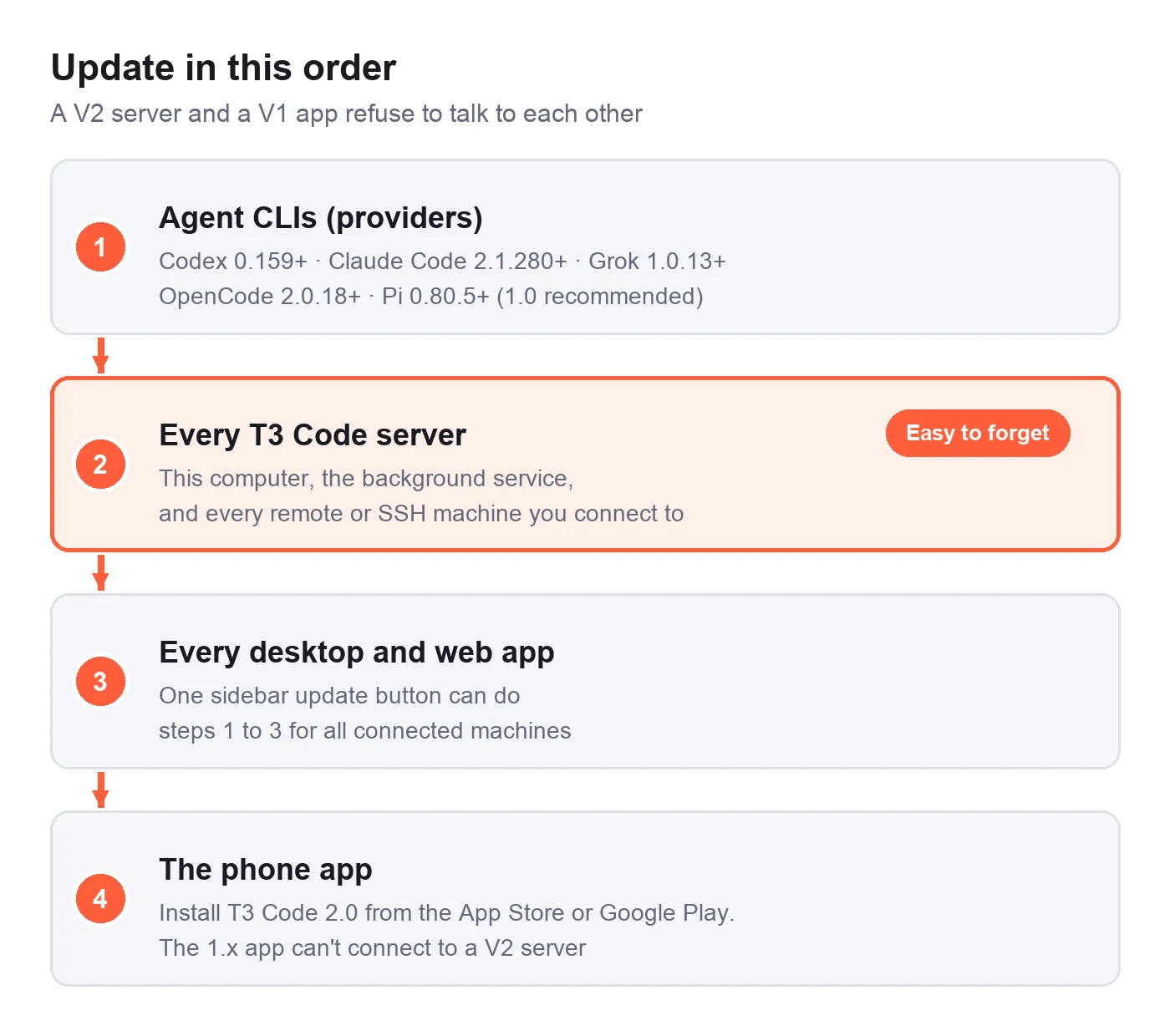
A V2 server and a V1 app refuse to connect to each other. Whichever side is older shows a notice that names the machine to update. Update everything in this order and you won’t see that notice.
3a. Update your agent CLIs
V2 needs these versions or newer:
| Agent | Minimum for V2 |
|---|---|
| Claude Code | 2.1.280 |
| Codex | 0.159 |
| Cursor | CLI build from 2026-05-09 |
| Grok | 1.0.13 |
| OpenCode | 2.0.18 (1.x works with limited support) |
| Pi | 0.80.5 (1.0 recommended) |
| Antigravity | 1.1.1 |
Check what you have:
claude --versioncodex --versionUpdate them the way you installed them, for example:
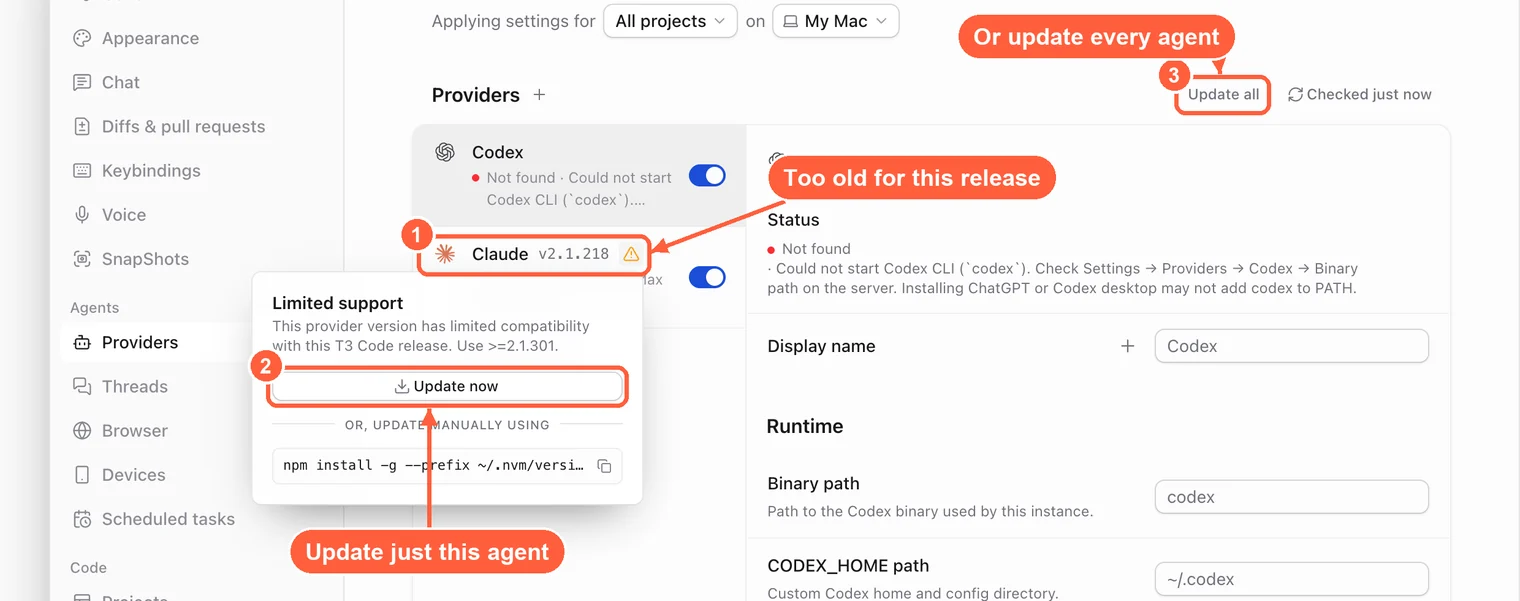
claude updatenpm install -g @openai/codex@latestThese were the minimums when V2 shipped in 0.1.0. Newer T3 Code releases can ask for newer agents. For example, 0.1.11 wants Claude Code 2.1.301 or newer. The reliable check is in the app: Settings → Providers puts a ⚠ next to any agent that is too old for the release you’re running.
OpenCode users: OpenCode 2 is a separate package,
@opencode/cli. It converts OpenCode’s shared database the first time it runs, so don’t run 1.x and 2.x side by side on the same machine.
3b. Update T3 Code itself
Desktop app: use the update button at the bottom of the sidebar. It updates outdated agents, then servers that are behind, then the desktop app, for every connected machine in one go. Hover over it to see what it will update.

If you’d rather do it by hand:
brew upgrade --cask t3-codewinget upgrade T3Tools.T3CodeA t3 server on another machine (SSH, a home server, a VPS): run this on that machine, replacing the version with the one your app shows:
t3 update <client-version>It asks before restarting the background service. If you say no, run t3 service restart later. If you start the server yourself with options like --host or --tailscale-serve, start it again with the same options.
If you run it with npx: there’s nothing to install. Stop the server and start it again on the new version:
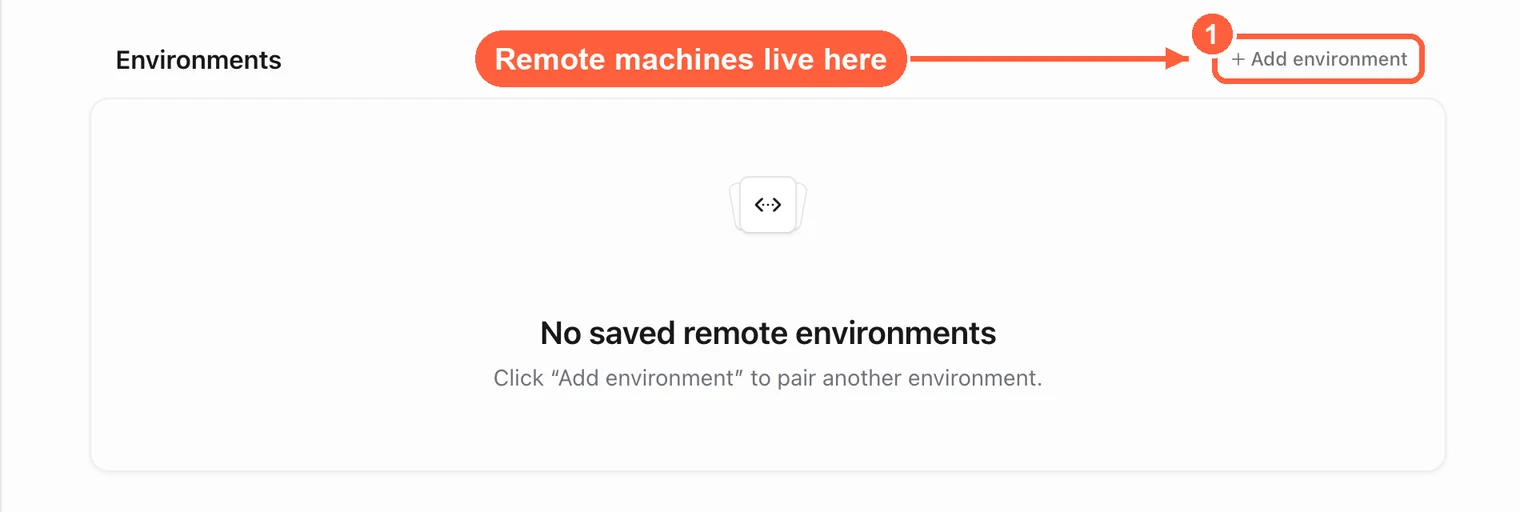
npx t3@latestRemote machines you’ve paired are listed in Settings → Environments. Go through that list and make sure each one is updated. They’re the easiest to forget.
Done when: every machine connects with no update notice.
3c. Update the phone app
The 1.x mobile app can’t connect to a V2 server. Install T3 Code 2.0 from the App Store or Google Play. If your store doesn’t offer 2.0 yet, open the web app in your phone’s browser until it does. You no longer need the TestFlight or Play beta. Those were only for the Nightly period.
Step 4: Open V2 and let it migrate
Start the updated app. On its first launch, V2:
- copies
state.sqlitetostatev2.sqlitein the same folder; - imports your threads. Long histories can take a few moments to fill in;
- copies stashed prompts, unsent drafts, layout and theme from the V1 desktop app.
You don’t need to run an import command. The desktop app uses a new browser profile, so you may need to sign in again to websites you open inside it.
Done when: your projects and threads are back in the sidebar.
Step 5: Check your important threads
Open the threads you noted in Step 1. Expect the conversation text to be there, but not the old diffs, the tool output, or the “Apply plan” cards. That’s normal for migrated threads, not a bug.
If a thread is missing entirely, don’t start an old version against your data. Read it from the backup you made in Step 2 instead. This opens a read-only copy:
sqlite3 -readonly ~/t3-userdata-backup-YYYY-MM-DD/state.sqliteList recent threads, then print one:
SELECT thread_id, title, updated_at FROM projection_threads ORDER BY updated_at DESC;SELECT role, text, created_at FROM projection_thread_messages
WHERE thread_id = '<thread-id>' AND role IN ('user', 'assistant')
ORDER BY created_at, message_id;Step 6: Continue an old thread without losing context
Your first message in a migrated thread starts a fresh agent session. The agent gets a trimmed selection of the old messages and can look up the rest, but it won’t automatically know which old instructions still matter. For long or important threads, restate them:
Continuing from before the V2 upgrade. Things that still apply:
- <the goal of this thread>
- <decisions we made, e.g. "use pnpm, not npm">
- <what's already done and what's left>
Read the earlier messages in this thread if you need more detail.
If the old thread has conflicting instructions, it’s cleaner to start a new thread and paste a short summary instead.
What changed in V2 (so nothing surprises you)
- The separate agents panel is gone. Subagents now appear in a lineage view and inline in the thread. Subagent threads are read-only, so message the parent thread instead.
- Workspace, Git and script controls moved into the thread details.
- The token-by-token streaming setting is gone.
- Grok no longer has Auto-accept edits. Those threads run in Supervised mode.
- Antigravity receives images directly. Other attachments are passed as file paths.
New things worth trying once you’re upgraded: delegate_task (an agent hands work to another agent, for example Claude plans and Codex builds), forking any thread, steering or queuing messages while the agent works, threads without a project, and scheduled tasks. The v0.1.0 release notes list everything.
Troubleshooting
| You see | Fix |
|---|---|
| A notice says to update T3 Code on a machine, or the connection is refused | The app and server are on different versions. Update the machine the notice names (Step 3b), then reconnect. |
| Phone app can’t connect | You’re on the 1.x app. Install 2.0 (Step 3c) or use the web app in your phone’s browser. |
| An agent shows a warning in Settings → Providers | Its CLI is older than the V2 minimum. Update it (Step 3a). |
| Mac app doesn’t reopen after updating from Alpha | The update can replace T3 Code (Alpha) with T3 Code (Beta). Open it from Applications or run open "/Applications/T3 Code (Beta).app", and re-add it to the Dock. |
| “T3 Code could not start” window | Click Update if offered. Otherwise the window links to the last version that started on your computer. Copy details gives you the error for a bug report. |
| Startup says another server owns the T3 home folder | Only one server can use a data folder at a time. Stop the other one (often a background service) and retry. |
| Old diffs or plans missing in an old thread | Expected. They aren’t migrated. The conversation text is. |
About
t3 doctor: it can offer to delete the oldstate.sqlite. It never picks that repair for you, and--fixskips it. Leave the file alone until you’re sure you don’t need to go back. Once it’s deleted, a pre-0.1.0 version starts with no threads or settings.
Sources: the upstream guide Moving from V1 to V2 (#14871), the v0.1.0 release notes, and the repo docs thread-migration.md and updating.md.
FAQ
Will I lose my threads when I update to T3 Code V2?
No. The first time a V2 server starts, it copies your V1 database (state.sqlite) to statev2.sqlite and migrates the copy. Titles, projects, branches, worktrees and the messages between you and the agent come with you. Old checkpoints, diffs, tool activity, approval history and plans do not.
Which version is Orchestrator V2?
Stable v0.1.0 and newer, and any Nightly build since 2026-10-03.
Why does my phone app say it can't connect after the update?
The 1.x mobile app can't talk to a V2 server. Update to T3 Code 2.0 from the App Store or Google Play. Until the update reaches you, open the web app in your phone's browser.
Can I go back to V1?
Yes. V1 keeps using its own state.sqlite, which V2 leaves in place. But nothing you do in V2 shows up in V1, and nothing from V1 after the copy shows up in V2.
Do I need to import my old threads by hand?
No. There is no import command to run. Large histories can take a few moments to fill in after the first launch.
Which agent versions does V2 need?
Codex 0.159+, Claude Code 2.1.280+, Grok 1.0.13+, OpenCode 2.0.18+ (1.x has limited support), Pi 0.80.5+ (1.0 recommended), and a Cursor CLI build from 2026-05-09 or newer. Those were the minimums at 0.1.0. Later releases can ask for more (0.1.11 wants Claude Code 2.1.301+), so check for a warning in Settings → Providers.