Short answer: yes. T3 Code runs on any 64-bit ARM Linux machine, including a Raspberry Pi 4 or 5 with 64-bit Raspberry Pi OS. The usual setup is to run the T3 Code server on the Pi, keep it on all the time, and open it from your laptop or phone.
Check your board first
Run these two commands on the Pi:
uname -mgetconf PAGESIZE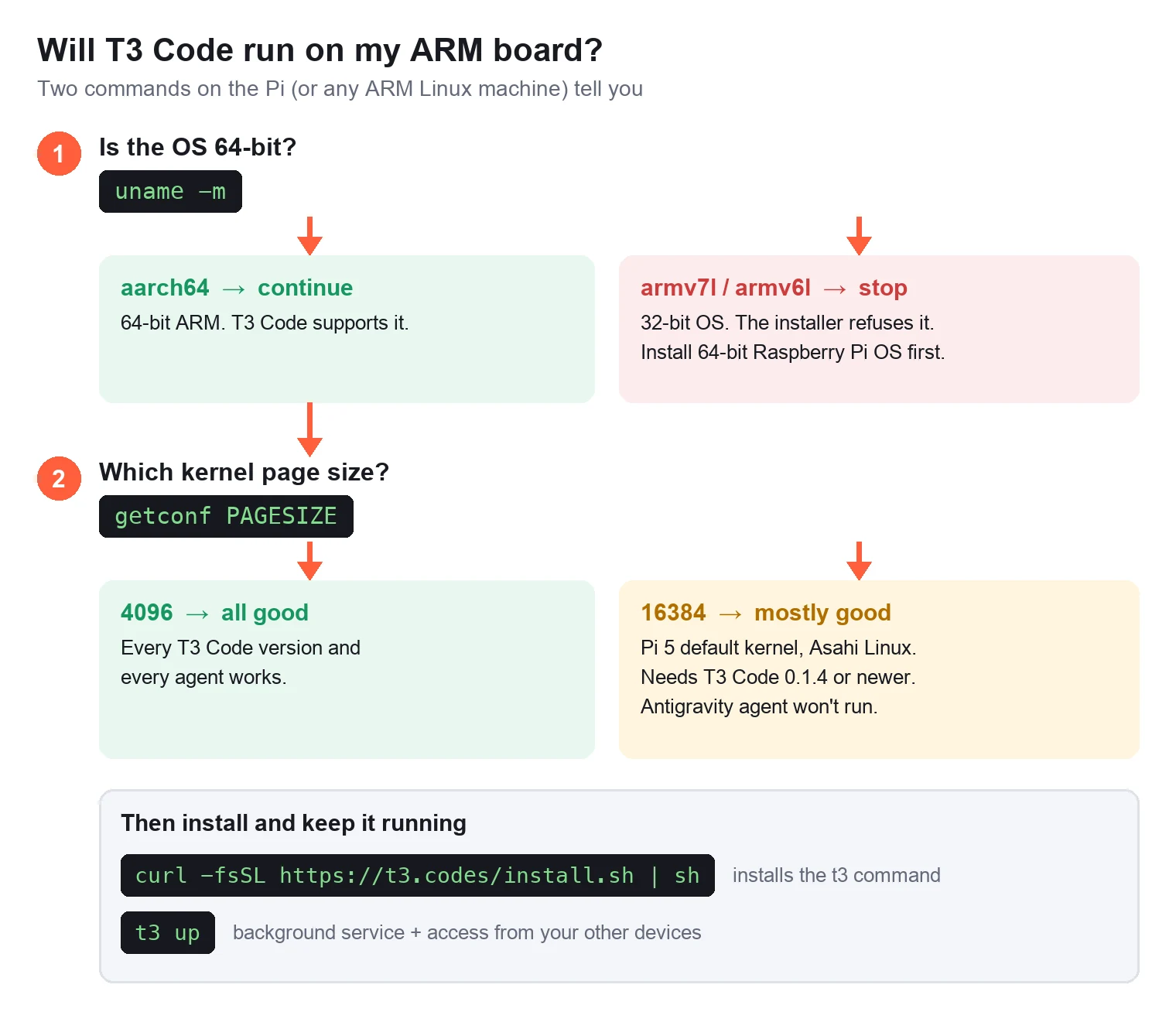
aarch64). ② The page size decides whether there's anything else to watch for.getconf PAGESIZE |
Typical setup | What it means |
|---|---|---|
4096 |
Pi 4, Pi 5 with its 4 KiB kernel, most ARM servers | Everything works |
16384 |
Pi 5 on its default kernel, Asahi Linux on Apple Silicon | Use T3 Code 0.1.4 or newer. The Antigravity agent won’t run |
Which file to download
Every release publishes ARM64 builds next to the x86 ones. On GitHub, the ARM64 Linux files are these three:
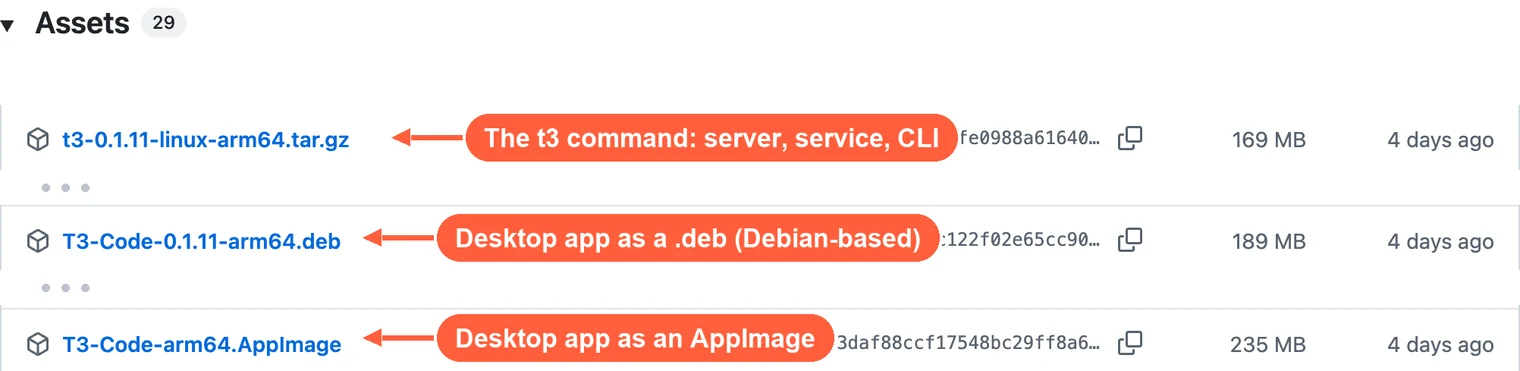
Set up a Pi as an always-on agent server
1. Use a 64-bit OS
Use 64-bit Raspberry Pi OS (or another 64-bit distro). uname -m must print aarch64. On a 32-bit system the installer stops with “unsupported architecture”.
2. Install and sign in to your agent on the Pi
Agents run on the same machine as the T3 Code server. Install the agent’s CLI on the Pi and sign in there, for example:
claude auth login3. Install the t3 command
curl -fsSL https://t3.codes/install.sh | shThe script picks the ARM64 build automatically. If it says ~/.local/bin isn’t on your PATH, run the command it prints, then open a new terminal.
4. Keep it running and reachable
t3 upt3 up installs the background service, so T3 Code starts with the Pi. It also sets up how your other devices reach it, over your local network, Tailscale or T3 Connect. To connect a laptop or phone, make a pairing code:
t3 pairIt prints a QR code and a pairing link. Scan it with the phone app, or open the link in a browser on your laptop.
Done when: t3 status shows the service running, and the T3 Code window on your laptop or phone shows the Pi's projects.
5. Optional: protect the server when memory runs low
Agents can use a lot of memory on a small board. This command makes the T3 Code server one of the last processes the system stops when memory runs out:
t3 service protectIt asks for sudo. On Raspberry Pi OS, the kernel’s memory controller is off by default, so only the “stop it last” part applies. t3 service status shows what’s in effect.
The Raspberry Pi 5 page-size crash (and the fix)
Symptom: on a Pi 5, t3 --version prints Segmentation fault, or npx t3 silently does nothing, and the background service won’t start.
Cause: T3 Code 0.1.2 and 0.1.3 were built in a way that ARM64 kernels with 16 KiB memory pages can’t load. The Pi 5’s default kernel is one of them, and so is Asahi Linux. The root cause was in Node.js, which T3 Code’s server is built on. T3 Code added a workaround in 0.1.4, and every ARM64 build is now checked for this before release.
Fix: get 0.1.4 or newer. If the old binary won’t even start, t3 update can’t run either, so run the install script again instead:
curl -fsSL https://t3.codes/install.sh | shThen restart the service:
t3 service restartThe maintainers have called this workaround temporary, until Node.js ships its own fix. If a future update fails to start on a Pi 5, the switch below is a reliable way out.
Switch a Pi 5 to its 4 KiB kernel
You also need this for the Antigravity agent, whose ARM64 Linux runtime only works on 4 KiB-page kernels. Raspberry Pi OS ships both kernels. Add this line to /boot/firmware/config.txt:
kernel=kernel8.imgReboot, then check:
getconf PAGESIZEIt should now print 4096.
Other ARM machines
- Apple Silicon Macs: the normal macOS download and the
t3command are both ARM64-native. Nothing special to do. - Asahi Linux on Apple Silicon: uses 16 KiB pages, so the Pi 5 notes above apply. Use 0.1.4 or newer, and Antigravity won’t run.
- Windows on ARM: each release includes an ARM64 installer (
T3-Code-…-arm64.exe) and an ARM64t3build (t3-…-win32-arm64.zip). - ARM cloud servers (AWS Graviton, Ampere and similar): treat them like any ARM64 Linux box. Install with the script and run
t3 up.
Sources: T3 Code’s install script and install.md, issues #23433 and #34427 and pull request #25825 in the pingdotgg/t3code repo, and the v0.1.11 release assets.
FAQ
Does T3 Code run on a Raspberry Pi?
Yes, on a 64-bit OS. Raspberry Pi 4 and 5 running 64-bit Raspberry Pi OS (uname -m prints aarch64) can run the t3 server and the ARM64 desktop app. 32-bit systems are not supported.
Why does t3 crash with "Segmentation fault" on my Raspberry Pi 5?
T3 Code 0.1.2 and 0.1.3 crash on ARM64 kernels that use 16 KiB memory pages, which includes the Pi 5's default kernel. It was fixed in 0.1.4. Update by running the install script again.
Does Antigravity work on a Raspberry Pi 5?
Not on the default 16 KiB-page kernel, because Google's ARM64 Linux runtime needs a 4 KiB-page kernel. Switch the Pi 5 to its 4 KiB kernel, or run Antigravity on another machine.
Can I use T3 Code on a Pi from my phone?
Yes. Run t3 up on the Pi to set up the background service and remote access, then pair your phone or laptop. The agents run on the Pi; your other devices are just windows into it.
Is there a T3 Code build for Windows on ARM?
Yes. Each release includes an ARM64 Windows installer and an ARM64 build of the t3 command, alongside the x64 ones.